Warning: This challenge is still active and therefore should not be resolved using this information.
Aviso: Este reto sigue en activo y por lo tanto no se debería resolver utilizando esta información.

Intro

This crackme is for the crack challenge 6 of canyouhack.it.

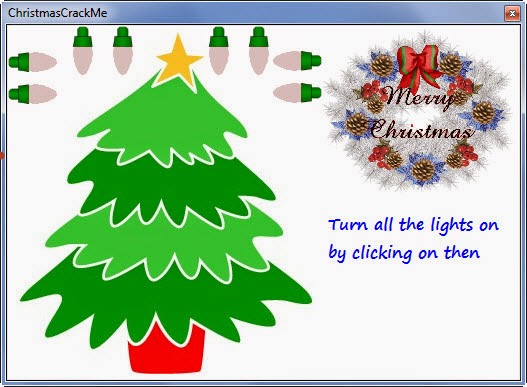
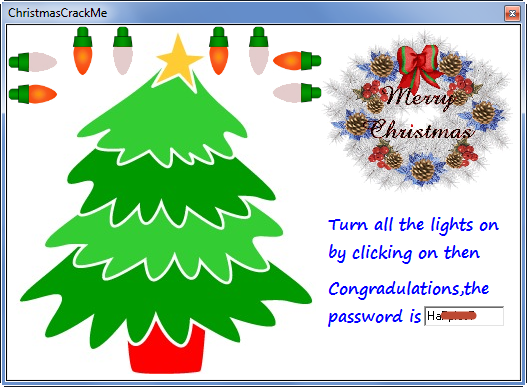
In this crackme the goal is to turn on all the lights. Note that a light off to the next, so if we interrupt this, we win.

Tools

Exeinfo (For crackme info)

Delphi Decompiler (For decompile)

 OllyDbg (For debug)
Decompiling

With Delphi Decompiler we can found easy the buttons and his offsets.
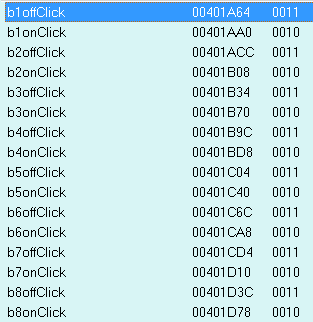
Go to the offset 401A64 in OllyDbg and analyze the code.
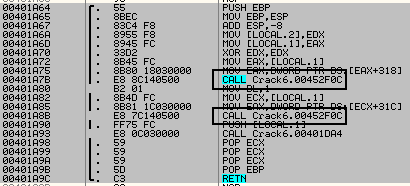
We view two jumps, one turn ON the light and the other Turn OFF the next light. Patching the call from offset 401A8B we get the serial.

Links


Introducción Desempacado Eliminar la NAG Password Nº serie asociado a un nombre Checkbox Trackbar Links Introducción Aquí tenemos un Crackme
Warning: This challenge is still active and therefore should not be resolved using this information. Aviso: Este reto sigue en
Intro Hoy tenemos un crackme hecho en ensamblador y que cuenta con tres niveles. En el primero de todos nos
Introducción Aquí tenemos un crackme hecho en Java, lo que como comprobareis a continuación no es muy buena idea ya

Introducción

Siguiendo con los crackmes que contienen RSA, esta vez tenemos un Keygenme del grupo PGC (Pirates Gone Crazy) que incluso servía para ser admitido en el grupo si mandabas la solución. Como veremos usa RSA32 + MD5 y en la parte de RSA ni siquiera usa el descifrado por lo que es de los sencillitos.

Resumen RSA

Parámetros

p = Primer número primo
q = Segundo número primo
e = Exponente público que cumpla MCD(e,(p-1)*(q-1))==1
n = Módulo público siendo n=p*q
d = Exponente privado que cumpla d=e^(-1) mod ((p-1)*(q-1))

De este modo y n son la parte pública de la clave y d y n la parte privada. Los número primos q se utilizan solo para generar los parámetros y de ahí en adelante se pueden desechar.

Funciones de Cifrado/Descifrado

cifrado = descifrado ^ e mod n
descifrado = cifrado ^ d mod n

Debug

En las referencias de texto se ven a simple vista el exponente público e (10001) y el módulo n (8e701a4c793eb8b739166bb23b49e421)

Text strings referenced in RSA32+MD:.text
Address    Disassembly                                                     Text string
00401848   PUSH    RSA32+MD.00404104                                       ASCII "%.8x%.8x%.8x%.8x"
00401A72   PUSH    RSA32+MD.0040429C                                       ASCII "[PGCTRiAL/2oo2]"
00401AEE   PUSH    RSA32+MD.00404275                                       ASCII "10001"
00401AFE   PUSH    RSA32+MD.0040427B                                       ASCII "8e701a4c793eb8b739166bb23b49e421"
00401B43   PUSH    RSA32+MD.00404404                                       ASCII "Name Must Be >= 1 Character."
00401B57   PUSH    RSA32+MD.00404421                                       ASCII "Key Must Be >= 1 Character."
00401B6D   PUSH    RSA32+MD.0040443D                                       ASCII "Congratulations!"
00401B72   PUSH    RSA32+MD.0040444E                                       ASCII "                 You've done it!
Please send your keygen along with
source code to pgc@dangerous-minds.com
if you would like to be considered as
         a new member of PGC."
00401BE7   PUSH    0                                                       (Initial CPU selection)
00401C47   MOV     [DWORD SS:EBP-24],RSA32+MD.00404119                     ASCII "PGCWinClass"
00401C7C   MOV     [DWORD SS:EBP-24],RSA32+MD.0040424E                     ASCII "STATIC"
00401CDB   PUSH    RSA32+MD.00404115                                       ASCII "PGC"
00401CE0   PUSH    RSA32+MD.00404119                                       ASCII "PGCWinClass"
00401D13   PUSH    RSA32+MD.00404125                                       ASCII "EDIT"
00401D46   PUSH    RSA32+MD.00404125                                       ASCII "EDIT"
00401DFB   PUSH    RSA32+MD.00404115                                       ASCII "PGC"
00401E00   PUSH    RSA32+MD.0040424E                                       ASCII "STATIC"

Rutina de comprobación

00401A0E  /$  53            PUSH    EBX
00401A0F  |.  57            PUSH    EDI
00401A10  |.  56            PUSH    ESI
00401A11  |.  6A 11         PUSH    11                             ; /Count = 11 (17.)
00401A13  |.  68 AC424000   PUSH    RSA32+MD.004042AC              ; |Buffer = RSA32+MD.004042AC
00401A18  |.  FF35 94454000 PUSH    [DWORD DS:404594]              ; |hWnd = NULL
00401A1E  |.  E8 49080000   CALL    <JMP.&USER32.GetWindowTextA>   ; \GetWindowTextA
00401A23  |.  83F8 01       CMP     EAX,1
00401A26  |.  0F8C 17010000 JL      RSA32+MD.00401B43
00401A2C  |.  A3 6D424000   MOV     [DWORD DS:40426D],EAX
00401A31  |.  6A 22         PUSH    22                             ; /Count = 22 (34.)
00401A33  |.  68 BD424000   PUSH    RSA32+MD.004042BD              ; |Buffer = RSA32+MD.004042BD
00401A38  |.  FF35 98454000 PUSH    [DWORD DS:404598]              ; |hWnd = NULL
00401A3E  |.  E8 29080000   CALL    <JMP.&USER32.GetWindowTextA>   ; \GetWindowTextA
00401A43  |.  83F8 01       CMP     EAX,1
00401A46  |.  0F8C 0B010000 JL      RSA32+MD.00401B57
00401A4C  |.  A3 71424000   MOV     [DWORD DS:404271],EAX
00401A51  |.  6A 00         PUSH    0
00401A53  |.  E8 C8080000   CALL    RSA32+MD.00402320
00401A58  |.  A3 69424000   MOV     [DWORD DS:404269],EAX
00401A5D  |.  A1 71424000   MOV     EAX,[DWORD DS:404271]
00401A62  |.  FF35 69424000 PUSH    [DWORD DS:404269]              ; /Arg2 = 00000000
00401A68  |.  68 BD424000   PUSH    RSA32+MD.004042BD              ; |Arg1 = 004042BD
00401A6D  |.  E8 510A0000   CALL    RSA32+MD.004024C3              ; \RSA32+MD.004024C3
00401A72  |.  68 9C424000   PUSH    RSA32+MD.0040429C              ; /StringToAdd = "[PGCTRiAL/2oo2]"
00401A77  |.  68 AC424000   PUSH    RSA32+MD.004042AC              ; |ConcatString = ""
00401A7C  |.  E8 51080000   CALL    <JMP.&KERNEL32.lstrcatA>       ; \lstrcatA
00401A81  |.  68 AC424000   PUSH    RSA32+MD.004042AC              ; /String = ""
00401A86  |.  E8 4D080000   CALL    <JMP.&KERNEL32.lstrlenA>       ; \lstrlenA
00401A8B  |.  68 DF424000   PUSH    RSA32+MD.004042DF              ; /Arg4 = 004042DF
00401A90  |.  68 10454000   PUSH    RSA32+MD.00404510              ; |Arg3 = 00404510
00401A95  |.  50            PUSH    EAX                            ; |Arg2
00401A96  |.  68 AC424000   PUSH    RSA32+MD.004042AC              ; |Arg1 = 004042AC
00401A9B  |.  E8 60F5FFFF   CALL    RSA32+MD.00401000              ; \RSA32+MD.00401000
00401AA0  |.  6A 00         PUSH    0
00401AA2  |.  E8 79080000   CALL    RSA32+MD.00402320
00401AA7  |.  A3 5D424000   MOV     [DWORD DS:40425D],EAX
00401AAC  |.  6A 00         PUSH    0
00401AAE  |.  E8 6D080000   CALL    RSA32+MD.00402320
00401AB3  |.  A3 59424000   MOV     [DWORD DS:404259],EAX
00401AB8  |.  6A 00         PUSH    0
00401ABA  |.  E8 61080000   CALL    RSA32+MD.00402320
00401ABF  |.  A3 61424000   MOV     [DWORD DS:404261],EAX
00401AC4  |.  6A 00         PUSH    0
00401AC6  |.  E8 55080000   CALL    RSA32+MD.00402320
00401ACB  |.  A3 65424000   MOV     [DWORD DS:404265],EAX
00401AD0  |.  B8 02000000   MOV     EAX,2
00401AD5  |.  C1E0 04       SHL     EAX,4
00401AD8  |.  FF35 5D424000 PUSH    [DWORD DS:40425D]              ; /Arg2 = 00000000
00401ADE  |.  68 DF424000   PUSH    RSA32+MD.004042DF              ; |Arg1 = 004042DF
00401AE3  |.  E8 DB090000   CALL    RSA32+MD.004024C3              ; \RSA32+MD.004024C3
00401AE8  |.  FF35 65424000 PUSH    [DWORD DS:404265]              ; /Arg2 = 00000000
00401AEE  |.  68 75424000   PUSH    RSA32+MD.00404275              ; |Arg1 = 00404275 ASCII "10001"
00401AF3  |.  E8 CB090000   CALL    RSA32+MD.004024C3              ; \RSA32+MD.004024C3
00401AF8  |.  FF35 61424000 PUSH    [DWORD DS:404261]              ; /Arg2 = 00000000
00401AFE  |.  68 7B424000   PUSH    RSA32+MD.0040427B              ; |Arg1 = 0040427B ASCII "8e701a4c793eb8b739166bb23b49e421"
00401B03  |.  E8 BB090000   CALL    RSA32+MD.004024C3              ; \RSA32+MD.004024C3
00401B08  |.  FF35 59424000 PUSH    [DWORD DS:404259]
00401B0E  |.  FF35 61424000 PUSH    [DWORD DS:404261]
00401B14  |.  FF35 65424000 PUSH    [DWORD DS:404265]
00401B1A  |.  FF35 5D424000 PUSH    [DWORD DS:40425D]
00401B20  |.  E8 87120000   CALL    RSA32+MD.00402DAC
00401B25  |.  FF35 69424000 PUSH    [DWORD DS:404269]
00401B2B  |.  FF35 59424000 PUSH    [DWORD DS:404259]
00401B31  |.  E8 61080000   CALL    RSA32+MD.00402397
00401B36  |.  85C0          TEST    EAX,EAX
00401B38  |.  74 31         JE      SHORT RSA32+MD.00401B6B
00401B3A  |.  E8 85000000   CALL    RSA32+MD.00401BC4
00401B3F  |.  5E            POP     ESI
00401B40  |.  5F            POP     EDI
00401B41  |.  5B            POP     EBX
00401B42  |.  C3            RET
00401B43  |>  68 04444000   PUSH    RSA32+MD.00404404              ; /Text = "Name Must Be >= 1 Character."
00401B48  |.  FF35 98454000 PUSH    [DWORD DS:404598]              ; |hWnd = NULL
00401B4E  |.  E8 5B070000   CALL    <JMP.&USER32.SetWindowTextA>   ; \SetWindowTextA
00401B53  |.  5E            POP     ESI
00401B54  |.  5F            POP     EDI
00401B55  |.  5B            POP     EBX
00401B56  |.  C3            RET
00401B57  |>  68 21444000   PUSH    RSA32+MD.00404421              ; /Text = "Key Must Be >= 1 Character."
00401B5C  |.  FF35 98454000 PUSH    [DWORD DS:404598]              ; |hWnd = NULL
00401B62  |.  E8 47070000   CALL    <JMP.&USER32.SetWindowTextA>   ; \SetWindowTextA
00401B67  |.  5E            POP     ESI
00401B68  |.  5F            POP     EDI
00401B69  |.  5B            POP     EBX
00401B6A  |.  C3            RET
00401B6B  |>  6A 00         PUSH    0                              ; /Style = MB_OK|MB_APPLMODAL
00401B6D  |.  68 3D444000   PUSH    RSA32+MD.0040443D              ; |Title = "Congratulations!"
00401B72  |.  68 4E444000   PUSH    RSA32+MD.0040444E              ; |Text = "                 You've done it!
Please send your keygen along with
source code to pgc@dangerous-minds.com
if you would like to be considered as
         a new member of PGC."
00401B77  |.  FF35 8C454000 PUSH    [DWORD DS:40458C]              ; |hOwner = NULL
00401B7D  |.  E8 02070000   CALL    <JMP.&USER32.MessageBoxA>      ; \MessageBoxA
00401B82  |.  EB 00         JMP     SHORT RSA32+MD.00401B84
00401B84  |>  FF35 5D424000 PUSH    [DWORD DS:40425D]
00401B8A  |.  E8 BE070000   CALL    RSA32+MD.0040234D
00401B8F  |.  FF35 59424000 PUSH    [DWORD DS:404259]
00401B95  |.  E8 B3070000   CALL    RSA32+MD.0040234D
00401B9A  |.  FF35 61424000 PUSH    [DWORD DS:404261]
00401BA0  |.  E8 A8070000   CALL    RSA32+MD.0040234D
00401BA5  |.  FF35 65424000 PUSH    [DWORD DS:404265]
00401BAB  |.  E8 9D070000   CALL    RSA32+MD.0040234D
00401BB0  |.  FF35 69424000 PUSH    [DWORD DS:404269]
00401BB6  |.  E8 92070000   CALL    RSA32+MD.0040234D
00401BBB  |.  E8 04000000   CALL    RSA32+MD.00401BC4
00401BC0  |.  5E            POP     ESI
00401BC1  |.  5F            POP     EDI
00401BC2  |.  5B            POP     EBX
00401BC3  \.  C3            RET

Como vemos comprueba que tanto el nombre como el número de serie tengan al menos un dígito y a continuación comienza el chequeo del serial. El chequeo es muy sencillo ya que ni siquiera tenemos que buscar los números primos p y q y a continuación n, simplemente podemos obtener el número de serie con la parte pública de la clave (par de número e y n). Lo resumimos a continuación:

  1. Concatena nuestro nombre con la cadena «[PGCTRiAL/2oo2]»
  2. Crea el hash MD5 de la cadena concatenada.
  3. Cifra el hash usando el par de números e y n obtenidos en las referencias de texto.
1. deurus[PGCTRiAL/2oo2]
2. md5(deurus[PGCTRiAL/2oo2]) = dc8a39282da8539d11b8a6aec000c45a
3. dc8a39282da8539d11b8a6aec000c45a^10001 mod 8e701a4c793eb8b739166bb23b49e421 = 1FF83ECC5A65334DA2BC93C675A9BA15

Nombre: deurus
Serial: 1FF83ECC5A65334DA2BC93C675A9BA15
X^Y MOD Z para deurus

Keygen

//
// md5(deurus[PGCTRiAL/2oo2]) = dc8a39282da8539d11b8a6aec000c45a
//
var c = BigInt("0xdc8a39282da8539d11b8a6aec000c45a");
var e = BigInt("0x10001");
var n = BigInt("0x8e701a4c793eb8b739166bb23b49e421");
//
var serial = BigInt(0);
serial = powmod(c, e, n);
document.write(serial.toString(16));
//
//POWMOD
//
function powmod(base, exp, modulus) {
  var accum = BigInt("1");
  var i = BigInt("0");
  var basepow2 = BigInt(base);
  while ((BigInt(exp) >> BigInt(i) > BigInt(0))) {
    if (((BigInt(exp) >> BigInt(i)) & BigInt(1)) == BigInt(1)) {
      accum = (BigInt(accum) * BigInt(basepow2)) % BigInt(modulus);
    }
    basepow2 = (BigInt(basepow2) * BigInt(basepow2)) % BigInt(modulus);
    i++;
  }
  return BigInt(accum);
}

Enlaces

Primeras impresiones

El crackme es el típico de usuario y número de serie. Si no introduces un nombre te salta un messagebox indicándotelo y si introduces cualquier información sale un mensaje de error.
Si dejamos solamente el serial en blanco nos sale un mensaje de error muy interesante diciéndonos que introduzcamos un número entre 1 y 2^32. Por lo tanto ya sabemos que nuestro serial está entre 1 y 4294967296.
PEiD no arroja resultados pero una primera impresión con Ollydbg hace creer que está programado en ensamblador y que no está comprimido.

Al ataque con Ollydbg

Cargamos el crackme en Ollydbg y hacemos click derecho Search for > Names
Vemos dos referencias interesantes como son:
  •  &USER32.GetDlgItemInt
  •  &USER32.GetDlgItemTextA
Ponemos sendos breakpoints y damos al play.
Vemos que para en USER32.GetDlgItemTextAy que retorna al offset 4010E7
 
Vamos a 4010E7 y vemos que pasa.
 
Hace un Test eax,eax por si hemos introducido algún nombre y si no es así nos muestra la nag.
Continuamos con la ejecución y para en el siguiente breakpoint, esta vez el referente a USER32.GetDlgItemInt, vamos al offset 401108 a ver que nos espera.
 
Se puede ver claramente que carga en EAX nuestro número de serie en hexa, lo compara con ESI que vale 0 y si son iguales nag de error y si no continua a 401120 donde guarda en la pila nuestro nombre y serial y llama al offset 401000.
 
 Veamos que hay en el offset 401000.
 
Aquí vemos una primera parte con un bucle en el que interviene nuestro nombre y donde obtendremos el “HashName” y posteriormente una operaciones aritméticas en las que finalmente modifica el valor de EAX. Tengamos en cuenta que la comprobación final es un Test eax,eax o lo que es lo mismo, comprueba si EAX = 0 y si es 0 salta al mensaje de error como vemos en la imagen siguiente.
En resumen:
  • Obtenemos el HashName.
  • Realizamos unas operaciones a ese HashName (LOCAL.1) y al serial introducido (ARG.2).
  • Si EAX <> 0 entonces serial correcto.

Sacando el “HashName”

Veamos un ejemplo de obtención del hashname para el usuario “abc”. El bucle se repetirá tantas veces como letras tenga el nombre.

Entendiendo la comprobación del serial

 
En resumen:
  • Necesitamos que EAX <> 0.
  • Necesitamos que (HashName XOR Serial) = 0 ya que:
a.       La negación de 0 es 0 –>NEG(0) = 0
b.      La resta con acarreo de 0 – 0 = 0 –>SBB 0,0 = 0
 
Hay que tener en cuenta que la resta con acarreo (SBB) de cualquier número, dará como resultado en EAX = FFFFFFFF, que al incrementar en 1 quedará en 0.
Por lo tanto si cumplimos las condiciones anteriormente expuestas, al incrementar EAX con INC EAX, este quedará en 1 haciendo nuestro serial válido.

Generando el serial válido

 Las operaciones que se realizan sobre nuestro serial son NOT, SUB y XOR. Por suerte para nosotros son reversibles quedando nuestro serial así:
Serial válido = [NOT(HashName) + 0xBADC0DE5] XOR 0x1337C0DE
Para el nombre “abc” sería:
[(NOT(734111798) + 3134983653)] XOR 322420958 = 2620237168

 Keygen en ensamblador

Como no es propósito de este manual enseñar a hacer un keygen desde 0, muestro el código importante y adjunto los links del código fuente. Si quieres ver como se hace un keygen básico en ASM desde cero mira el tutorial del Keygen para el KeygenMe#01 de eBuC.

Enlaces

 Crackme + Keygen en ASM + WinASM studio 5.1.5 [31MB]

Warning: This challenge is still active and therefore should not be resolved using this information. Aviso: Este reto sigue en
http://youtu.be/b9-GdmIQINQ Lista de reproducción
Introducción A quien va dirigido Comprobaciones previas Lo que necesitamos Presupuesto Ejemplo de instalación Preguntas frecuentes Glosario Notas finales Introducción
Acabo de montar AperiSolve en una Raspi que tenía por casa pensando que sería coser y cantar, pero me he

Warning: This challenge is still active and therefore should not be resolved using this information.
Aviso: Este reto sigue en activo y por lo tanto no se debería resolver utilizando esta información.

Table of Contents

Intro

This crackme is for the challenge Mobile 2 of canyouhack.it.
This time you need to understand how the crackme works over the web.

Decompiling

The crackme is given again at Google Play, so the first step is to install and recover the APK for decompiling. The latter, I leave to you.
Open the victim with APK Studio and view the content of Mobile2.java
First we view one link:
http://canyouhack.it/Content/Challenges/Mobile/2/index.php
 If we go to the link, we view one string like a hash: 68a571bcf7bc9f76d43bf931f413ab2c. Umm, it’s like MD5. Go to decrypt online and we get the pass: «canyouhack.it». But if we test this password in the crackme, surprise!, nothing happens. We need to continue analyzing the code. Later we view the next interesting link:
«http://canyouhack.it/Content/Challenges/Mobile/2/submit.php?Token=» + Mobile2.token + «&Attempts=»
The program submit one token and concatenate with the number of attempts. Ok but what is the token and what is the number of attempts?
In this point we have to try with the information we already have.
Testing with the link of bottom we get “Nice try!” message.
http://canyouhack.it/Content/Challenges/Mobile/2/submit.php?Token=68a571bcf7bc9f76d43bf931f413ab2c&&Attempts=0
Testing with the link of bottom we get “Very Good, the password is Top*****!” message.
http://canyouhack.it/Content/Challenges/Mobile/2/submit.php?Token=68a571bcf7bc9f76d43bf931f413ab2c&&Attempts=1

  Links